Hero
Build a portfolio site
you own outright.
Open Portfolio is a free, open-source portfolio website builder — a self-hosted alternative to Adobe Portfolio, Squarespace, Wix and Framer. Edit every word, image and colour from an admin panel. Your content lives in your database, on your domain, and it stays there when you stop paying anybody.
MIT licensed · no account needed to try it · nothing to cancel
Verify
What you can check right now
Nobody is using this yet. There are no customer logos on this page and no testimonials, because there are no customers and no users. Here is everything you can verify for yourself instead, one click each.
- MIT licenceAlready released, and not revocable for anything already released.Read it
- One repositoryEvery commit, every issue, every decision and every reversal.Open it
- Version 0.5.0, alphaThe version is on this page because it is alpha, and you should know that before you type in a portfolio.Changelog
- docker compose upOne command, app and database together. The container was destroyed and rebuilt against the same volume and every piece of content survived.Tested
- Export everything, any timeOne JSON file with every word, setting and link. The button exists today; it is not on a roadmap.Shipped
- 676 testsIncluding a conformance suite every storage backend must pass before it ships — and the rule that authentication state never travels inside a content export.CI
Steps
Three steps, and none of them is a terminal
Step one
Deploy it
Press the button. Your own copy is created in your own GitHub account with a free database attached, and you invent one setup phrase — the only thing you have to remember. Or run one Docker command on a machine you already have.
Step two
Claim it, answer four questions
Your name and what you do, the kind of work you show, a colour, then publish. The second question renames sections to language that fits your field — a photographer gets Portfolio and Brands I’ve shot for where a developer gets Projects and Stack. Every step is skippable and nothing is permanent.
Step three
Edit anything, any time
Click a heading and change it. Swap an image from your library. Add a page, stack blocks, set that page’s own search description, preview it, publish when you are ready. Drafts stay private until you press publish.
Features
What it does today
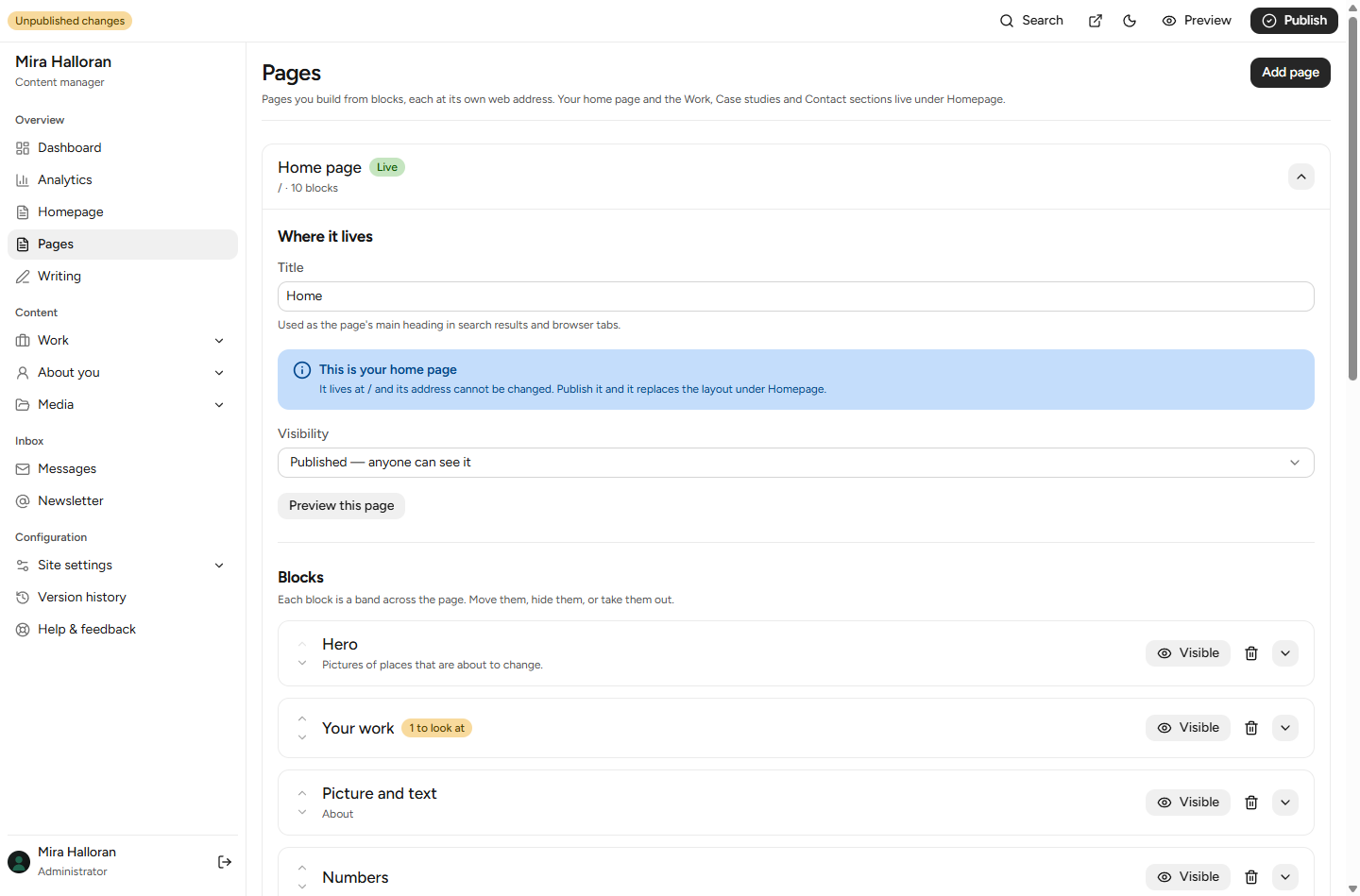
Everything on the page is editable
Work, case studies, clients, experience, education, process, capabilities, testimonials, writing, navigation, the footer, the microcopy, the typography, the colours and the search metadata all live in a content store rather than in the code. If you can see it, you can change it without opening a file.
Pages built from twenty-seven blocks
A hero, text, images, a gallery, figures, cards, a call to action, a contact form, questions and answers, a video, a picture beside text, a quote, a newsletter box, your social links, what you offer, a file to download, and space. Seven more place your own records — including your writing — so updating a project updates every page showing it. Your home page is built the same way.
Draft, preview, publish
Edits save as you type, into a draft. Visitors keep seeing the published version until you decide otherwise. Preview a draft at its real address with a banner so you never mistake it for the live site. Every publish snapshots the whole site and any snapshot can be restored.
It answers the post
A contact form that actually delivers, an inbox inside the admin so a message is never lost if email is misconfigured, and optional SMTP so you are notified. A dashboard that checks your published site for what is missing, each finding linking to the screen that fixes it.
Six themes, and writing
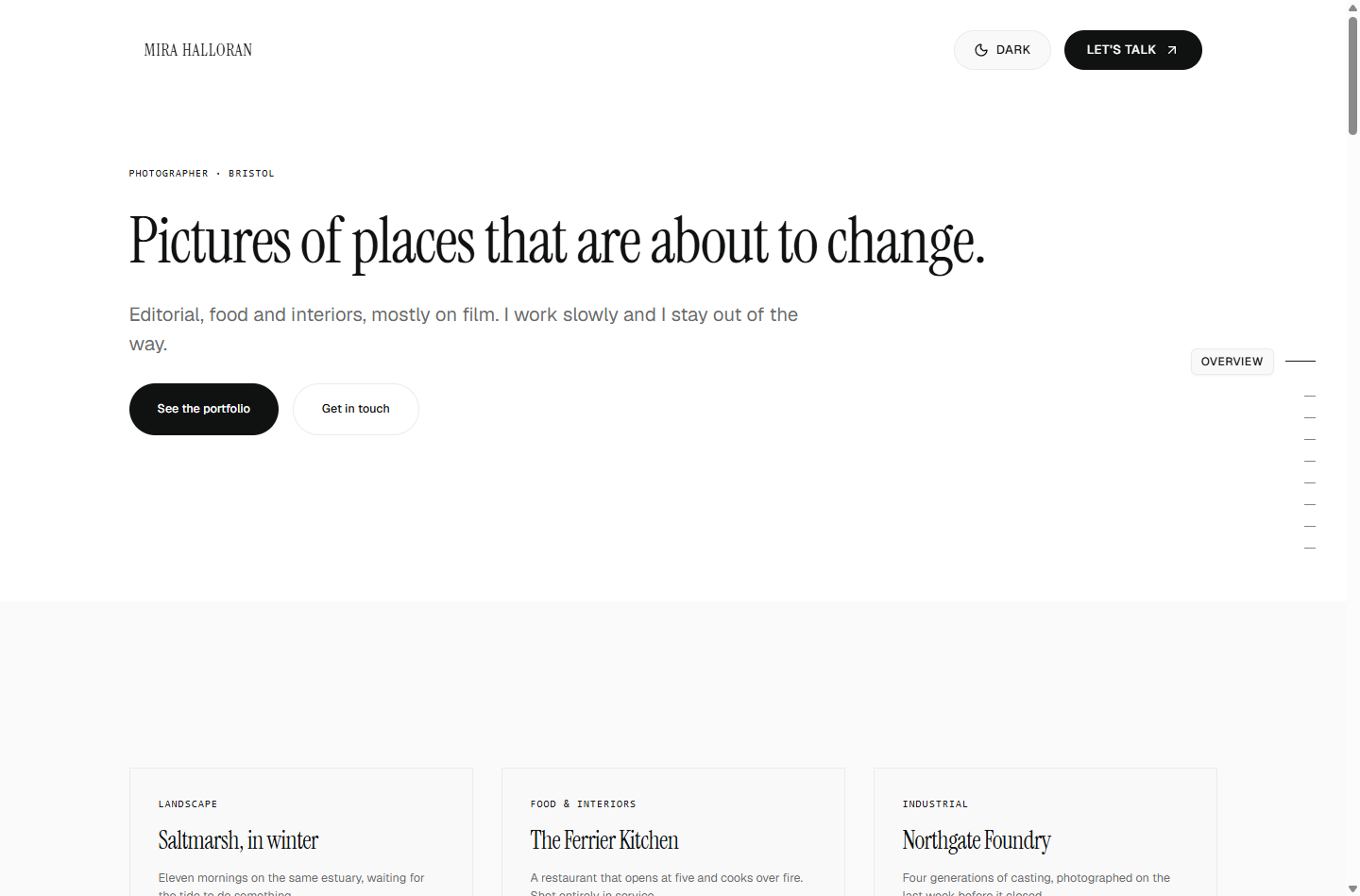
Editorial, Terminal, Gallery, Warm, Bold and Minimal — each changing palette, typeface, spacing and corner radius together, in light and dark, and each checked against the same contrast rules that block publishing. Essays or notes or posts, called whatever fits what you do, with RSS.
A mailing list, without a mailing-list account
Visitors can ask to hear from you. Everyone confirms by email before they are on the list, leaving takes one press from the mail client itself, and the list downloads as a CSV that Buttondown and Mailchimp import directly. Nothing sends from here — the export is the exit.
Costs
What it costs to run
Nothing, to us. There is no paid tier, no account and nothing to cancel. What you pay is whatever your hosting and your domain cost, and these are the real numbers.
| Where you run it | Cost | The catch, stated plainly | Source |
|---|---|---|---|
| Vercel Hobby + a free Neon database | $0/month | Hobby is for non-commercial personal use only. If your portfolio advertises services for sale, read the clause before you use it. | Verified · 12 August 2026 |
| Netlify free | $0/month | Netlify moved to a credit model, and what one credit buys is not published anywhere we could find. | Unverified · 12 August 2026 |
| Supabase free | $0/month | Projects pause after about a week of low activity. A portfolio nobody visits for seven days is exactly that profile. | Verified · 12 August 2026 |
| A server you already have, with Docker | Your electricity | You maintain it. That is a real commitment, not a formality. | — |
| A small VPS | A few pounds a month | Same as above. We have not price-checked providers, so compare them yourself. | — |
A domain is roughly £10–15 a year from a registrar of your choosing. We have not price-checked registrars, we do not sell domains and we do not take a cut.
Ownership
The part everyone finds out too late
Three facts, each from the vendor’s own documentation, each with the date we read it. Quoting somebody’s own support article is the only form of comparison that cannot be argued with.
Wix’s own support article says: "Since Wix is a SaaS solution, your site must run on Wix’s servers."
Squarespace’s export leaves out portfolio pages, gallery pages, style settings and custom CSS — the one content type it markets hardest to creatives is the one it will not give back.
Adobe Portfolio has no export at all, and if your Creative Cloud subscription lapses the site "will remain live for 14 days. After this 14-day grace period, your site will come offline."
Here there is nothing to get out, because it was never in. The database is yours, on infrastructure you chose. An export button hands you every word, every setting and every link in one JSON file. The code is MIT, so you can fork it, change it, sell what you build with it, and keep running the version you have for as long as you like — whatever happens to this project.
Deploy
Somewhere you chose
One click
Vercel copies the repository into your own GitHub account, provisions a free Neon database and a blob store for your images, and asks you to invent one setup phrase. No keys to find, nothing to install.
One command
docker compose up
On any machine with Docker — a rented server, an old laptop, a Raspberry Pi. App and database together. No account anywhere and nothing that phones home.
Or a database you already run
Postgres anywhere, Supabase, Neon, or the local filesystem. Whichever backend’s environment variables are present is the one that gets used, so provisioning a database is the only step.
Gaps
What does not work yet
Being direct about this, because the gaps are structural and you should not find them after typing in a portfolio.
- Uploads on hosted object storesVerified end to end on both Supabase Storage and Vercel Blob: upload through the admin, then an anonymous fetch of the result. Supabase cost two real bugs that would have broken every Supabase deployment after its first boot.Tested
- The admin on a phoneIt installs to a home screen and works, but the editing screens were drawn for a desktop. No notifications.Not built
- One of nine backendsLocal filesystem, Postgres, Supabase, Neon + Vercel Blob, Firebase, Cloudflare D1+R2, PocketBase and Appwrite are built. Convex needs an account rather than an emulator, so it is blocked on signup, not code.Not built
- Themes change tokens, not layoutSix of them change colour, type, spacing and radius together. None of them rearranges a page — that comes from the blocks you choose, not the theme.By design, for now
- Sign-inAn email and a passphrase — plus passkeys enrolled in Settings and emailed one-time codes. All three are offered on the sign-in page.Shipped
- Sending a newsletterIt collects addresses, confirms them and exports them. It does not send. Broadcasting is a different product with different obligations.Deliberate
Maker
Who is behind this
One person, Shadman Arafin. This is not a company. There are no investors, no staff, no hosted service and nothing to sell you.
It exists because a portfolio should not be a subscription, and because every open-source option that already existed stopped at the point where somebody non-technical needed to write a config file.
Bug reports from actually using the admin are the most useful thing anybody can send — and you can send one from inside your own admin, without visiting GitHub. It checks first whether somebody already reported it, and whether it is already fixed in a newer version.
FAQ
Questions people actually ask
Is it really free? What is the catch?
No paid tier, no account, nothing gated, and no plan to add any. The catch is that you host it, and hosting a thing is a real job — small, but real. The cost page is the honest version.
What happens to my site if you stop working on this?
Nothing. It is running on your infrastructure, from a version you already have, under a licence that cannot be withdrawn from anything already released. You can fork it. That is the whole point of the arrangement and it is not a promise — it is what the licence already does.
Will you go closed source later?
Everything released so far is MIT and stays MIT — a licence cannot be revoked from a version already published. What nobody can honestly promise is what a future version is licensed under, and any project telling you otherwise is telling you something it cannot enforce. What protects you is that you can keep and fork the version you have.
Do I need to know how to code?
No, to use it. Two of the three install paths are a button and one command; the third is for people who want to run it from source. After that everything is the admin, and there is a separate help centre that never shows you a terminal.
Can I move my existing Squarespace or Wix site over?
Not automatically, and be careful of anyone who says otherwise — Wix has no export at all and Squarespace’s omits exactly the portfolio and gallery pages you would want. In practice you copy your text and re-upload your images. For a portfolio that is an evening, not a project.
Is it ready to put my actual work on?
It is alpha, and this page says precisely what that means and who should wait. The short version: your content is safe — it is in your database, exportable at any moment, and an older build quarantines content it does not understand rather than dropping it. What is not settled is the admin.
What does it look like? Can I change the design?
Six themes, each changing palette, typeface, spacing and radius together in light and dark, and you can override any part of one. What a theme cannot yet do is rearrange the page — that comes from which blocks you place. The demo is the fastest answer.
Can I sell websites built with this?
Yes. MIT — use it, fork it, charge for what you build with it. One caution: if you deploy client sites on Vercel’s Hobby plan, read their non-commercial clause first. It is quoted in full on the cost page.
CTA
A portfolio site you own outright.
Try the live demo first. Nothing to sign up for, and it forgets you after an hour.